

The Meta Ads daily report in Slack is one PaidSync card that posts at about 9:00 in the brand's time zone, or 9:00 UTC when no zone is set, in the brand's own channel. It shows yesterday's spend, conversions, cost per conversion and clicks, each with an arrow against the day before, a Meta row in the platform table, and the month against the brand's monthly budget. Follow-up questions go in the card's thread. A pause of a Meta ad set waits as an approval card until a person who can edit the brand presses Approve.
Disclosure: PaidSync.ai publishes this page. The pictures come from our Slack guide and use a made-up brand, Northwind Outdoor, with made-up numbers.
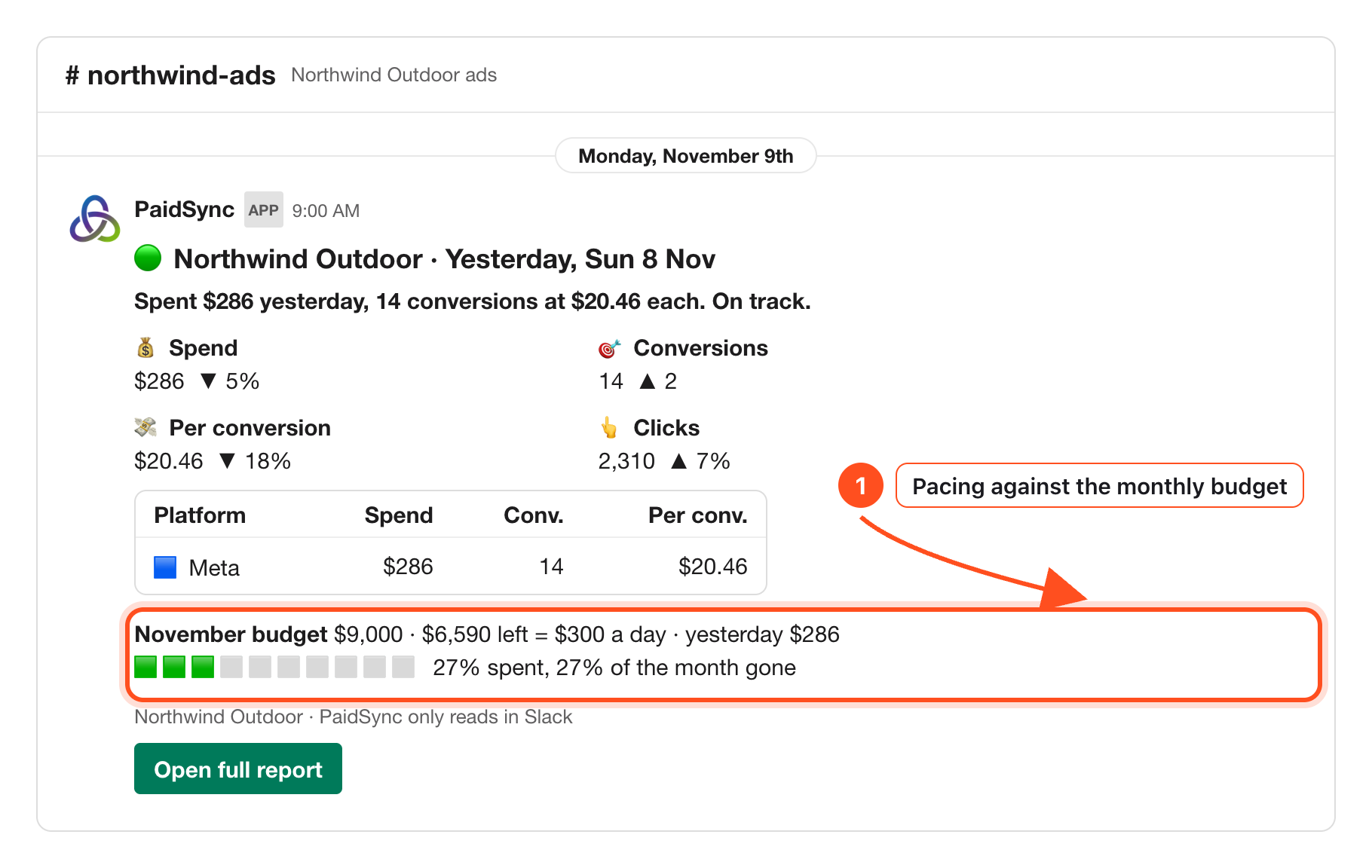
What the morning card shows for Meta
The card covers yesterday in the brand's time zone. Every number on it comes from the same reads as the PaidSync report, never from the AI, so the card and the report always match. Top to bottom:
- A status dot and one sentence. In the picture: "Spent $286 yesterday, 14 conversions at $20.46 each. On track."
- Four numbers against the day before. Spend, conversions, cost per conversion and clicks.
- A table with one row per platform. Meta gets its own row with spend, conversions and cost per conversion. Facebook and Instagram ads run from a Meta ad account, so they share that row, and two or more Meta ad accounts on one brand add up into it.
- Spend over the last 14 days. A small chart, so one odd day stands out against the two weeks around it.
- The month against the monthly budget in the brand's Brief: the budget, what is left, what that leaves a day, and how much of the month is gone.
- Up to three findings under What stood out.
- A grey line that ends "PaidSync only reads in Slack", and an Open full report button.
When a Meta ad account bills in a different currency from the card, the card converts it at the European Central Bank rate, the same way the report does, and the grey line says so.
How to read the Meta row against the day before
Spend, cost per conversion and clicks move in percent. Conversions move as a count, so ▲ 2 means two more than the day before. Here is the card in the first picture, read line by line.
| Number | On the card | How to read it |
|---|---|---|
| Spend | $286 ▼ 5% | Meta spent a little less than the day before. |
| Conversions | 14 ▲ 2 | Two more conversions than the day before. |
| Per conversion | $20.46 ▼ 18% | Each conversion cost 18% less. Down is the good direction here. |
| Clicks | 2,310 ▲ 7% | More clicks for less money. |
| November budget | 27% spent, 27% of the month gone | On pace. $6,590 left is $300 a day, and yesterday was $286. |
The arrows compare like with like. If Meta had not loaded the day before, the card leaves the arrows out instead of comparing a full day with a partial one.
What the status color means
- Green. On track.
- Orange. Something to look at: the month is running more than 10 points ahead of its pace, cost per conversion is up more than 30% on the day before, or a platform has not loaded.
- Red. Spend went from something the day before to nothing yesterday, or a platform could not be read.
When Meta's numbers for yesterday are not in at 9:00, the card says yesterday is not loaded yet and waits. After 12:00 it posts with Meta marked not loaded in its row, never as $0, so a missing day never reads as a day with no spend.
The findings under What stood out
- The campaign that brought the most of yesterday's conversions.
- A campaign that took more than 15% of the day's spend with no conversions. On Meta this is often a prospecting campaign worth a closer look.
- When the brand also runs Google Ads or another platform, the platform whose cost per conversion this month is at least twice another's.
Ask follow-up questions about Meta in the thread
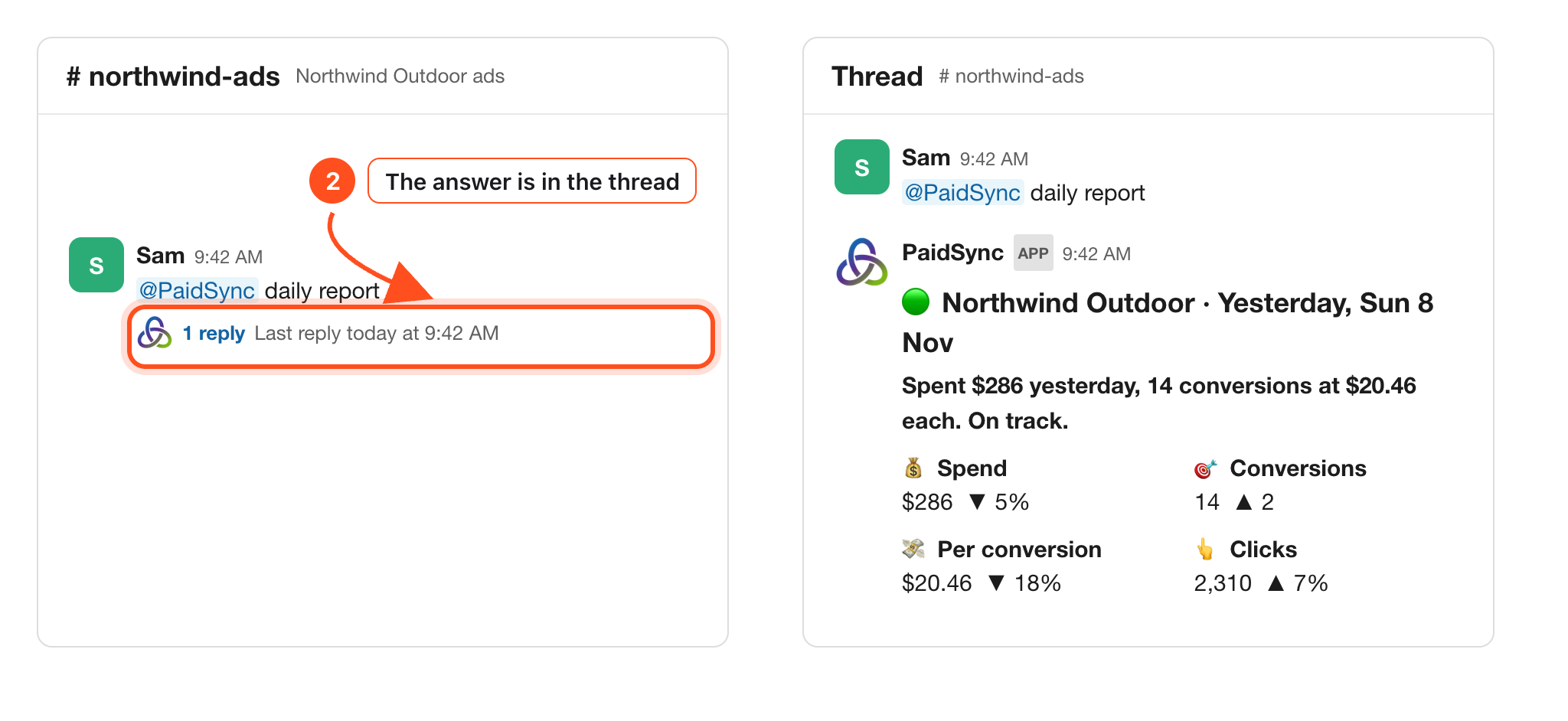
Type @PaidSync daily report in the brand's channel and the same card comes back in the thread of your message, at any time of day. The thread remembers the card's dates, so a follow-up there, such as why spend went up, is answered for those same dates.
@PaidSync daily report@PaidSync which Meta ad sets spent yesterday with no conversions?@PaidSync why did cost per conversion fall on Meta yesterday?
A reply in the thread without a mention only reads. To prepare a change, mention @PaidSync.
Set a Meta watch for the hours you are not looking
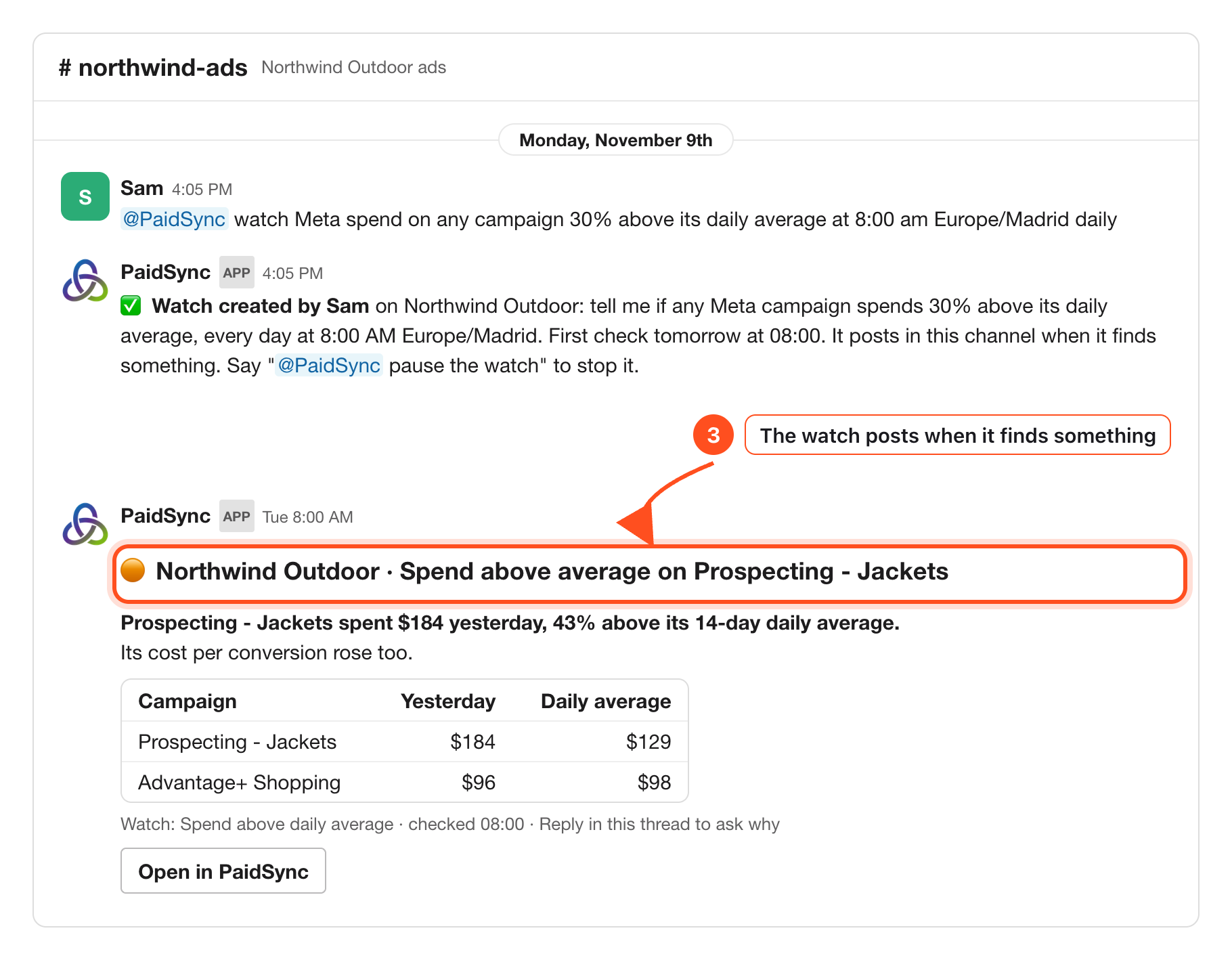
A watch is a check PaidSync runs at a time you pick. A watch that names Meta, a campaign or an ad set runs as an AI check of the brand's data. A plain number on the brand's total, such as spend above 500, becomes a numbers check with no AI.
PaidSync checks every 15 minutes, so a watch runs at about the time you set. It posts a new message in the channel only when it finds something and stays quiet when it does not. A watch only reads; it never changes the ad account.
@PaidSync watch Meta spend on any campaign 30% above its daily average at 8:00 am Europe/Madrid daily@PaidSync watches
Pause a Meta ad set from Slack, with approval
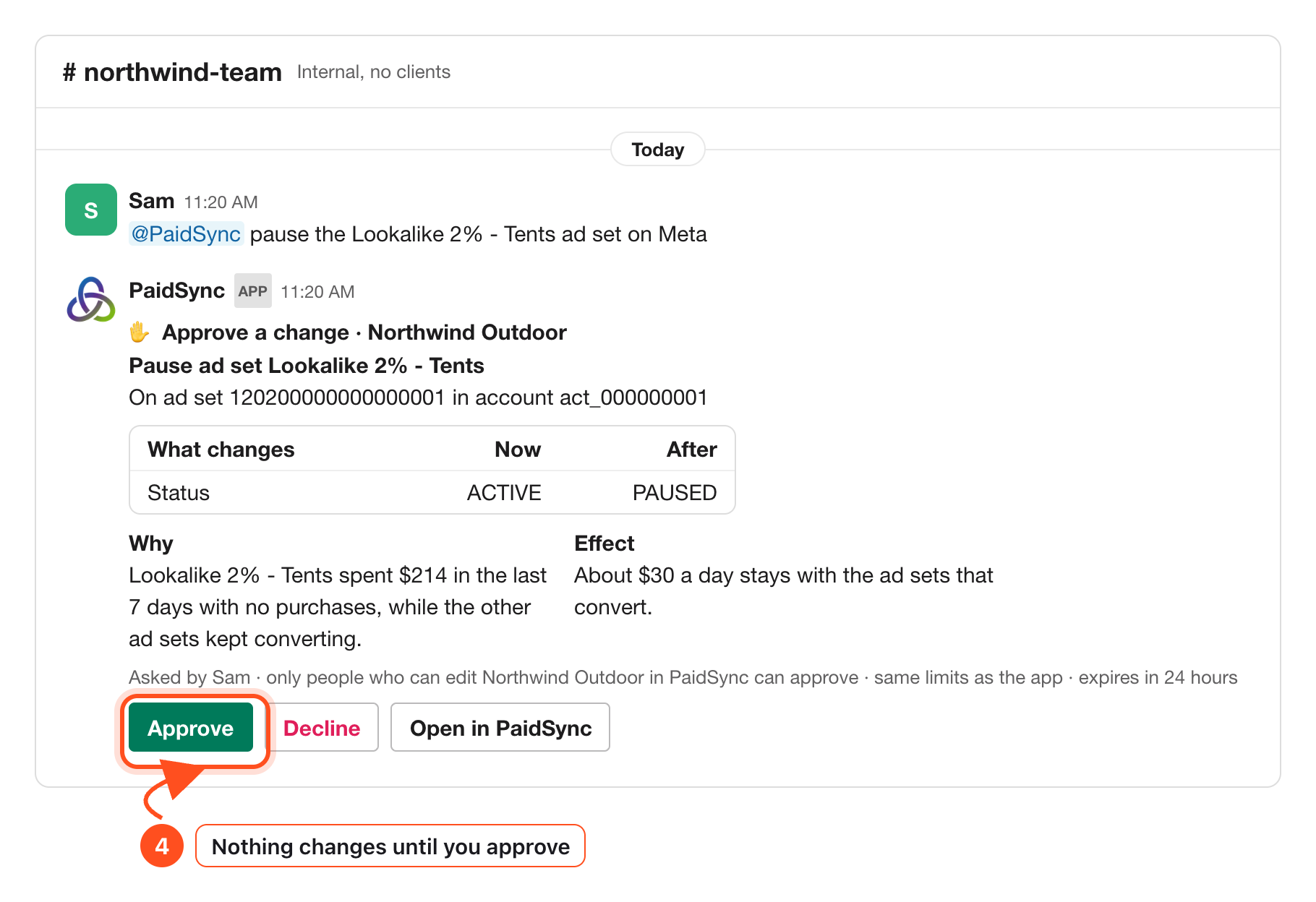
When the card or a watch points at an ad set that spends without results, ask for the pause in an internal channel or a direct message with PaidSync. PaidSync prepares it as a card that names the ad set and the account, with a table of the status now and after: ACTIVE to PAUSED.
@PaidSync pause the Lookalike 2% - Tents ad set on Meta
Nothing runs on its own. Only people who can edit the brand in PaidSync can press Approve, a guest never can, and the card expires after 24 hours. Turning the ad set back on works the same way, as a card from PAUSED to ACTIVE.
In a channel shared with another company, or one with guests in it, PaidSync only reads and prepares no change there.
Change the budget the card paces against
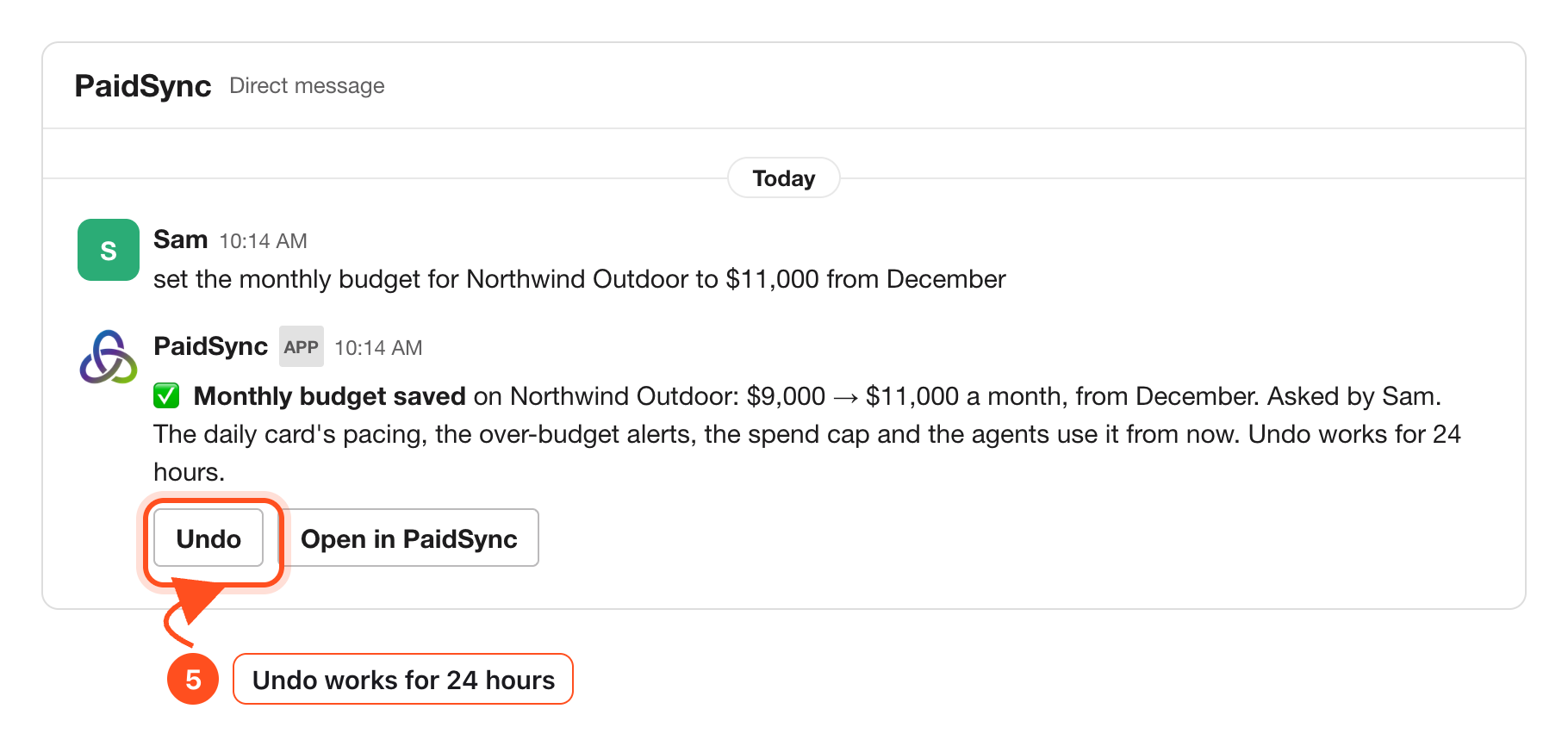
The budget line on the card reads the monthly budget in the brand's Brief in PaidSync. It is a PaidSync setting, not a Meta campaign budget. Someone who can edit the brand says the new amount in words in Slack, and the reply shows old to new and who asked, with Undo for 24 hours.
Before your first Meta report
The card needs Meta connected to a brand in PaidSync and PaidSync added to one Slack channel for that brand. The setup page walks through it screen by screen. If the brand runs more than Meta, the all-platforms article shows how each platform gets its own row.
How to connect Meta Ads to Slack Setup → How to get your Google Ads, Meta, TikTok and LinkedIn results in Slack All platforms →Frequently Asked Questions
What time does the Meta Ads daily report post in Slack?
At about 9:00 in the brand's time zone, or 9:00 UTC when the brand has no time zone set. Type @PaidSync daily report in the brand's channel to get the same card at any time.
Do Facebook and Instagram ads get separate rows?
No. Facebook and Instagram ads run from a Meta ad account, so they share one row named Meta. Two or more Meta ad accounts on the same brand add up into that row.
What happens when Meta has not loaded yesterday?
Before 12:00 the card says yesterday is not loaded yet and waits. After that it posts with Meta marked not loaded in its row, never as $0, so a missing day never reads as a day with no spend.
Can I pause a Meta ad set from Slack?
Yes, with approval. PaidSync prepares the pause as a card with the status now and after, ACTIVE to PAUSED, and nothing runs until a person who can edit the brand in PaidSync presses Approve. The card expires after 24 hours. In a channel shared with another company or with guests, PaidSync only reads.
Is the budget on the card my Meta campaign budget?
No. It is the monthly budget in the brand's Brief in PaidSync, which the card uses for pacing. Someone who can edit the brand can change it in Slack, with Undo for 24 hours.