

TikTok Ads reporting in Slack with PaidSync.ai comes as a daily card, answers on demand and watches. Every morning at about 9:00 in the brand's time zone, one card posts in the brand's channel with yesterday's spend, conversions, cost per conversion and clicks against the day before, a TikTok row next to any other connected platform, and the month against the brand's monthly budget. Anyone in the channel can mention @PaidSync to ask about TikTok in plain words, and a watch posts a new message only when TikTok spend moves the way you described.
Disclosure: PaidSync.ai publishes this page. The pictures below come from our Slack guide and use a made-up brand, Northwind Outdoor, with made-up numbers.
This page is about reading TikTok numbers once they are in Slack. If TikTok is not connected yet, How to connect TikTok Ads to Slack shows each setup screen, and the all-platform Slack report covers Google Ads, Meta and LinkedIn in the same channel.
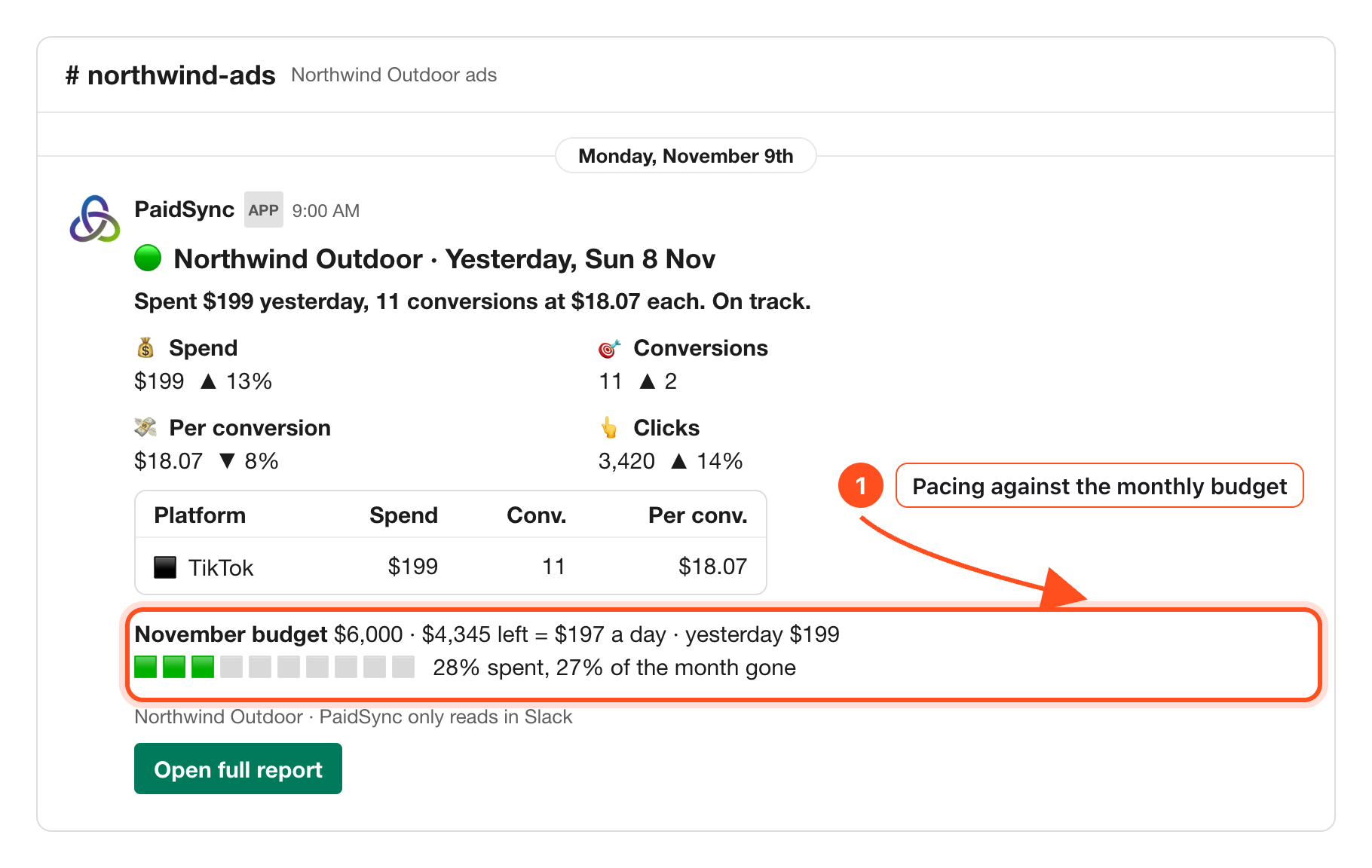
What the TikTok row tells you each morning
The card opens with the brand, the day it covers and one sentence, for example "Spent $199 yesterday, 11 conversions at $18.07 each. On track." The dot beside the brand is green when nothing needs a look, orange when something does, and red when spend stopped or a platform could not be read.
Under it sit four numbers with an arrow against the day before: spend, conversions, cost per conversion and clicks. Then the platform table. TikTok gets its own row with spend, conversions and cost per conversion. With Google Ads or Meta connected to the same brand, they get rows too and a Total row sums them, so the team reads TikTok against the rest without opening TikTok Ads Manager.
The line marked in the picture is the month. It reads the brand's monthly budget from its Brief, what is left, what that leaves per day, and two bars: how much of the budget is spent and how much of the month is gone. In the example the brand runs only on TikTok, so 28% spent with 27% of the month gone means TikTok is pacing close to plan.
When the card points at TikTok
Below the numbers, a "What stood out" list holds up to three findings read off the same data:
- The campaign that brought the most conversions yesterday.
- A campaign that spent more than $10 and more than 15% of the day with no conversions, such as a TikTok campaign that drew clicks and nothing else.
- A platform whose cost per conversion this month is at least twice another's, for example TikTok against Meta.
A late TikTok day is never a zero
If TikTok's numbers for yesterday have not loaded, the card waits until 12:00 in the brand's time zone. After that it posts with TikTok named as "not loaded" in its row, or "could not read" if the account could not be read. A missing day never shows up as a day with no spend.
If the TikTok account reports in a different currency from the brand, the card converts it at the European Central Bank rate and says so in the grey line at the bottom, the same way the full PaidSync report does.
Ask about TikTok in plain words
Mention @PaidSync in the brand's channel and the answer comes back in a thread. @PaidSync daily report returns the same card as the morning one, on demand. If one Slack workspace holds several brands, add up to three words that name the brand, such as @PaidSync report northwind.
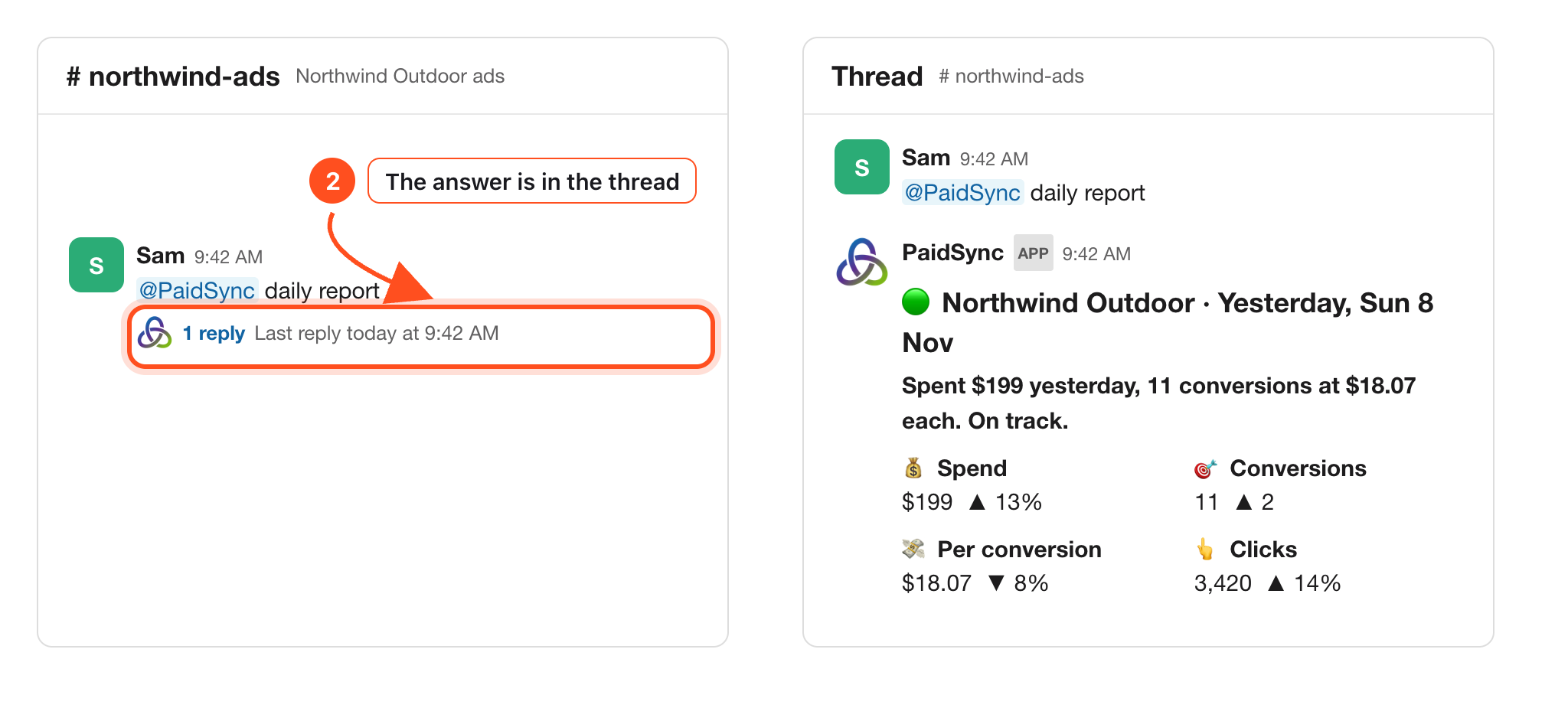
A question with a time span in it goes to PaidSync's AI, which answers from the brand's data and names the dates it used. Questions that fit TikTok:
@PaidSync TikTok spend and conversions, last 7 days@PaidSync how did TikTok do this month compared with last month?@PaidSync which TikTok campaign cost the most per conversion last week?
Keep talking in PaidSync's thread to narrow the answer, or message PaidSync directly when the question is for you alone.
Get a message when TikTok spend moves
A watch is a check PaidSync runs at a time you pick, every day or on one weekday. Write it in plain words and name TikTok. PaidSync shows it as a card to create or cancel, then says when the first check runs.
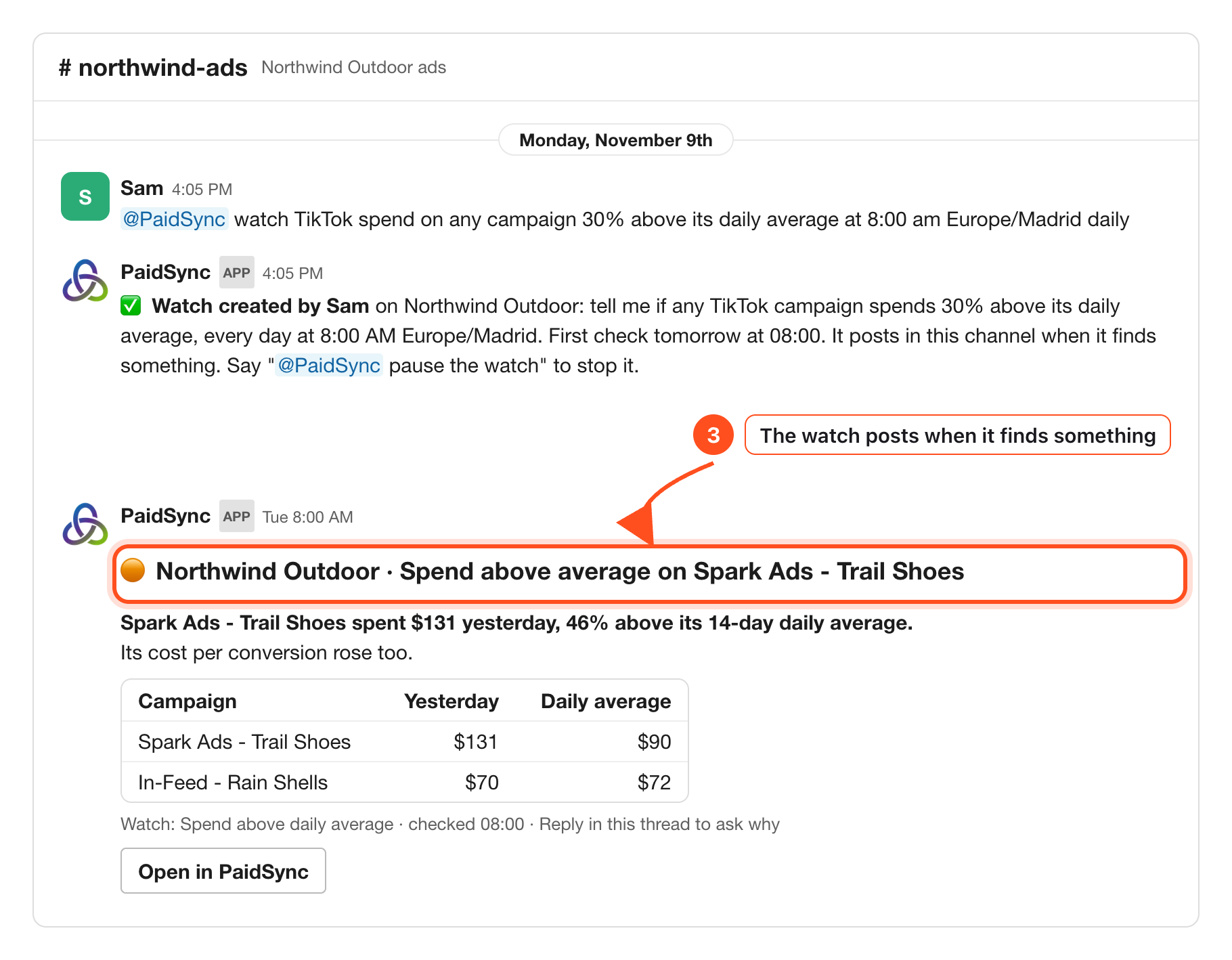
In the example, Sam asked to hear about any TikTok campaign spending 30% above its daily average. The next morning PaidSync posted that Spark Ads - Trail Shoes spent $131 against a $90 average, with In-Feed - Rain Shells in the same table for comparison. Replying in that thread asks why.
- PaidSync checks every 15 minutes, so a watch runs at about the next quarter hour after the time you set.
- It posts a new message in the channel when it finds something, and nothing when it does not.
- A watch that names TikTok or a campaign is an AI check of the brand's data. A plain number on the brand's total, such as
spend above 500, is a numbers check with no AI. - A watch only reads. It never changes the TikTok account.
Other TikTok watches you can write:
@PaidSync watch TikTok campaigns that spent with no conversions yesterday at 9:00 am daily@PaidSync watch TikTok cost per conversion against last week every Monday at 9:00 am
TikTok changes happen in PaidSync
Slack approves a pause, an enable or a budget change for Google Ads and Meta. TikTok is not in that list. When a TikTok change is prepared from Slack, its card carries only an Open in PaidSync button, and the change is reviewed and approved there. In a channel shared with another company or with guests, PaidSync only reads.
One setting Slack does save is the brand's monthly budget, the number the daily card paces against. It is a PaidSync Brief setting, not a TikTok campaign budget, so nothing changes inside TikTok.
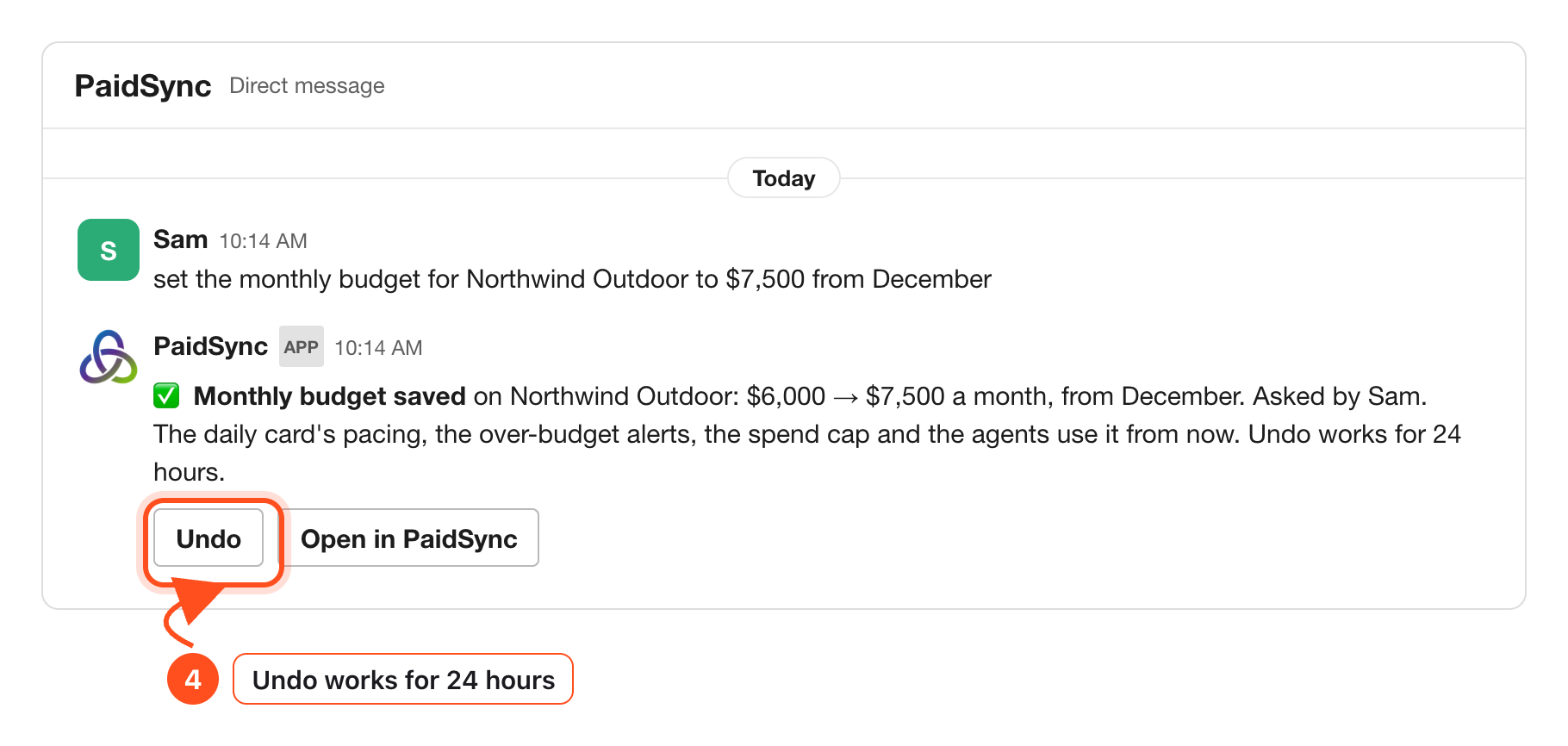
The reply names the old and new amount, the month it starts, who asked, and what uses it from then on: the daily card's pacing, the over-budget alerts, the spend cap and the agents.
Setup and the other platforms
How to connect TikTok Ads to Slack TikTok setup → How to get your Google Ads, Meta, TikTok and LinkedIn results in Slack All platforms →Frequently Asked Questions
Which TikTok numbers does the daily Slack card show?
TikTok's row shows yesterday's spend, conversions and cost per conversion. Above the table, spend, conversions, cost per conversion and clicks are compared with the day before, and a line paces the month against the brand's monthly budget.
Can TikTok sit next to Google Ads and Meta in one card?
Yes. Each platform connected to the brand gets its own row, and a Total row adds them up when there is more than one.
What if TikTok has not loaded when the card is due?
The card waits until 12:00 in the brand's time zone. After that it posts with TikTok named as not loaded, never as zero.
Can I approve a TikTok change in Slack?
No. Slack approves changes for Google Ads and Meta. A TikTok change card shows Open in PaidSync, and the change is approved there.
How do I get an alert when TikTok spend jumps?
Mention @PaidSync with a watch in plain words, for example "watch TikTok spend on any campaign 30% above its daily average at 8:00 am Europe/Madrid daily". It posts in the channel only when it finds something.