

Google Ads alerts in Slack come from watches: a team member asks @PaidSync in the brand's channel to watch spend, conversions or cost per conversion, and PaidSync checks every 15 minutes and posts a new message only when it finds something. A question in the alert's thread gets an answer in that thread. A pause, an enable or a daily budget change on a Google Ads campaign is prepared as a card showing now and after, and nothing runs until a person who can edit the brand presses Approve. A card expires after 24 hours.
Disclosure: PaidSync.ai publishes this page. The pictures come from our Slack guide and use a made-up brand, Northwind Outdoor, with made-up numbers.
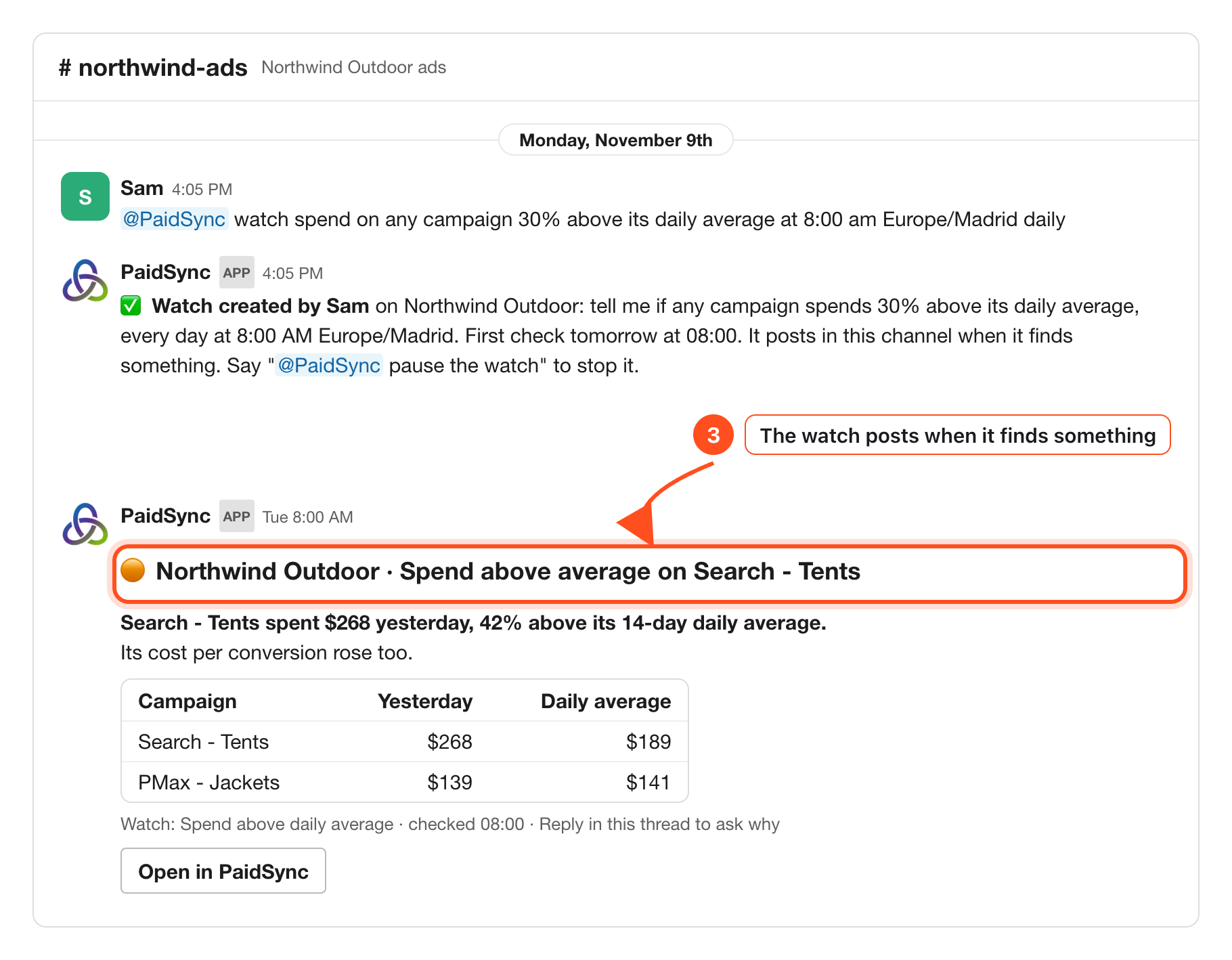
What a Google Ads alert says
An alert is a watch that found something. In the picture, Sam asked PaidSync to flag any campaign that spends 30% above its daily average, checked every day at 8:00 Europe/Madrid. PaidSync confirmed the watch, said when the first check runs, and told Sam how to stop it.
The next morning the watch found one: Search - Tents spent $268 against a $189 daily average, with cost per conversion up too. PMax - Jackets sat at its usual level, so it is listed for comparison and nothing more.
The alert arrives as a new message in the brand's channel, never buried in an old thread. When a check finds nothing, PaidSync posts nothing, so a quiet channel means a quiet account. A watch only reads. It never changes the Google Ads account.
Two kinds of watch for Google Ads
PaidSync reads your words and sorts the watch into one of two kinds. Both run on the same 15 minute check.
- A numbers check, no AI. One number on the brand's total crossing a line: spend, conversions, clicks, impressions, cost per conversion, cost per click, click-through rate or ROAS. For example, cost per lead goes over 50, spend above 500 or ROAS below 2, judged on yesterday, the last 7 days or the last 30 days.
- An AI check of your data. Anything about one campaign, one platform, or "than usual". "Any campaign 30% above its daily average" is this kind, and so is any watch that names Google.
Pick the numbers check when you have a hard line you never want crossed. Pick the AI check when you want PaidSync to spot which Google Ads campaign drifted from its own normal.
@PaidSync watch spend on any campaign 30% above its daily average at 8:00 am Europe/Madrid daily@PaidSync list my watches@PaidSync pause the watch
Each listed watch says when it last ran, what that run did and when it runs next, so "did it run?" has a real answer.
Ask why in the alert's thread
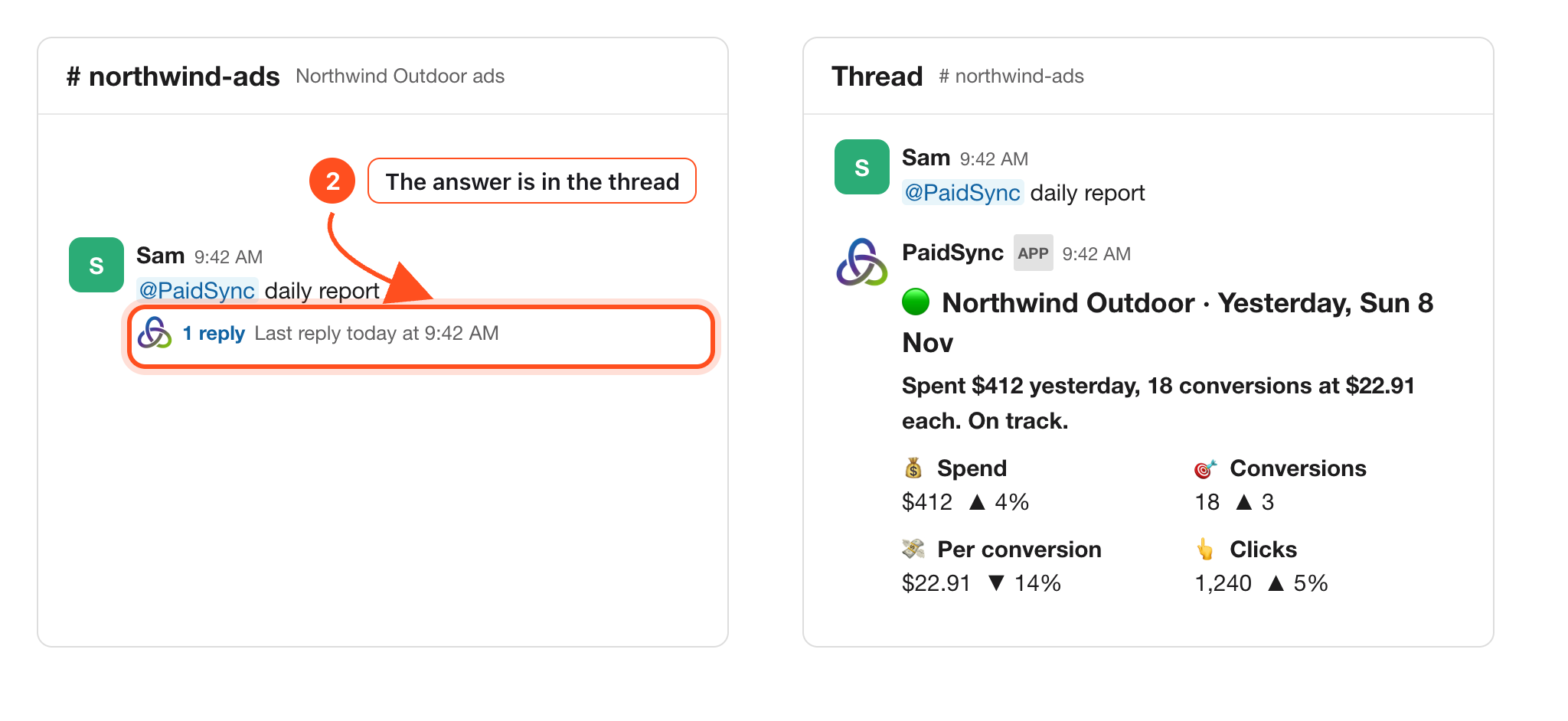
Every alert ends with "Reply in this thread to ask why". A question there goes to PaidSync even without a mention, and the answer stays under the alert where the team can see it. Ask what drove the jump, whether conversions kept up, or how the campaign did over the last 7 days.
The same works under the daily card. Mention @PaidSync with "daily report" and the card comes back in the thread.
Approve a Google Ads change in Slack
Once you know why, ask for the fix. In Slack, PaidSync can prepare three Google Ads changes for approval: pause a campaign, enable a campaign, and change a campaign's daily budget.
Each request becomes a card with what changes, the value now and the value after. In the picture Sam asks to raise the daily budget on Search - Tents from $150 to $180, and the card explains why and the expected effect. Nothing runs on its own. Only people who can edit Northwind Outdoor in PaidSync can press Approve, the same limits as the app apply, and the card expires after 24 hours.
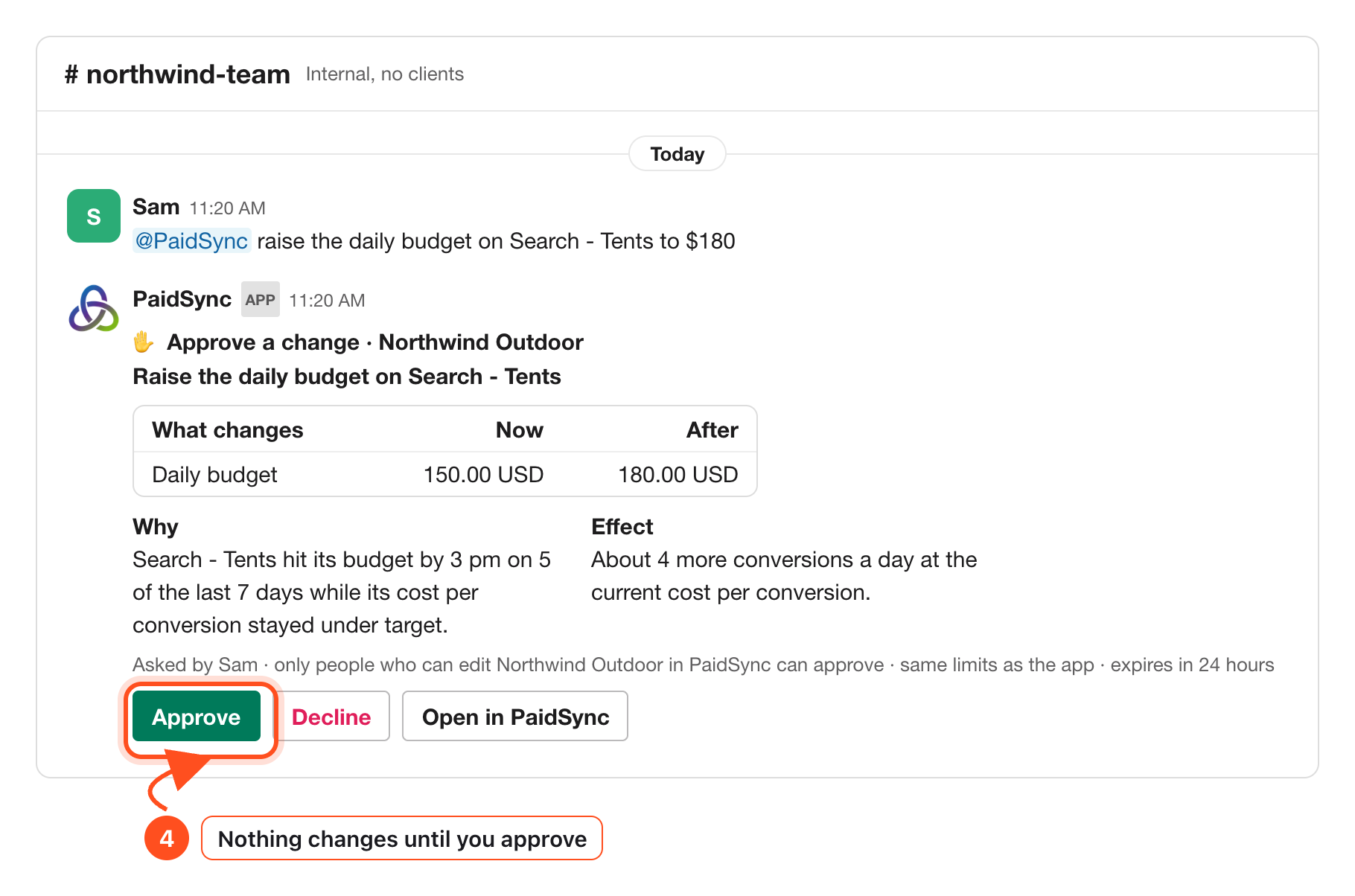
Make changes in an internal channel or a direct message. In a channel shared with another company, or one with guests in it, PaidSync only reads, so nobody outside your company can trigger a change there.
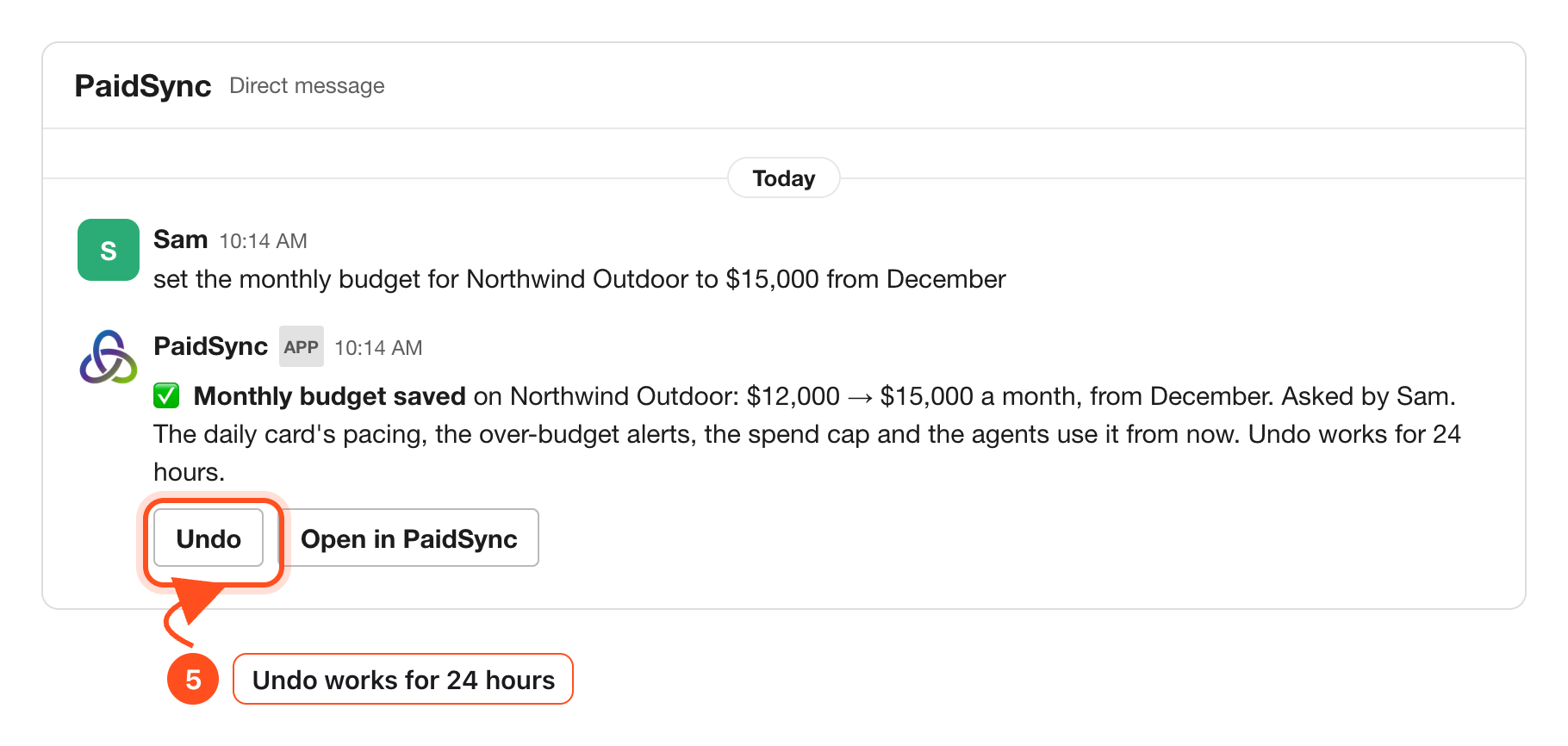
Set the budget the alerts judge by
The monthly budget lives in the brand's Brief, and an editor can set it in Slack in plain words. The reply shows old to new, the month it starts and who asked, with Undo for 24 hours. From then on the daily card's pacing and the over-budget alerts use the new number.
The daily card is the baseline
Alerts tell you when something moved. The daily card tells you where things stand. At 9:00 in the brand's time zone, or 9:00 UTC when the brand has none, one card posts with yesterday's spend, conversions, cost per conversion and clicks against the day before, a Google Ads row, and the month against the monthly budget.
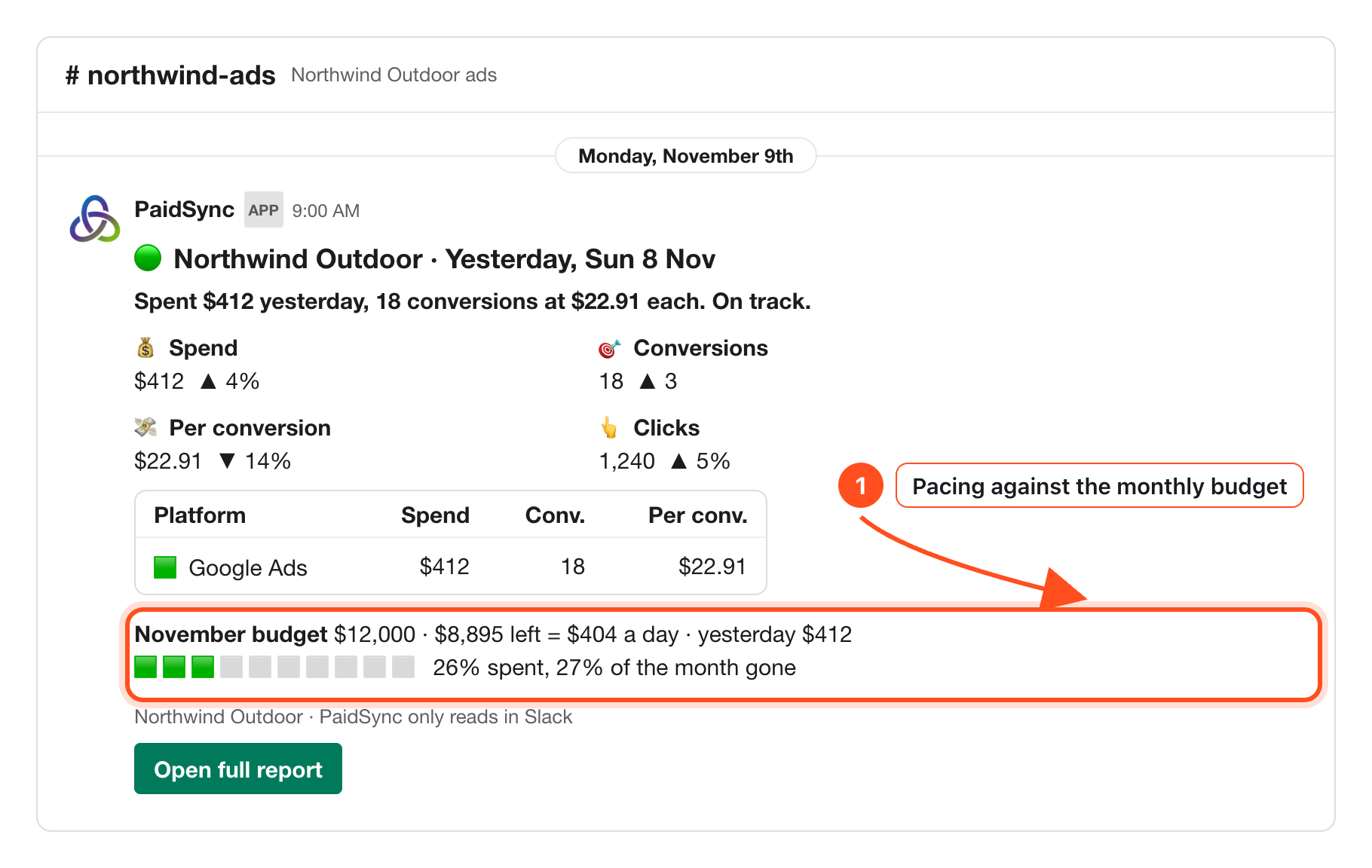
If Google Ads has not loaded for the day yet, the card names it as not loaded instead of showing a zero, so a late sync never reads as a day without spend.
Not connected yet? The Google Ads to Slack setup page walks through adding PaidSync to Slack and picking the brand's channel, and the Slack guide shows every screen.
More on ads in Slack
How to connect Google Ads to Slack Setup → Google Ads, Meta, TikTok and LinkedIn results in one Slack channel Every platform → PaidSync in Slack, the setup and daily use guide Slack guide →Frequently Asked Questions
Which Google Ads changes can I approve in Slack?
Three: pause a campaign, enable a campaign, and change a campaign's daily budget. Each is prepared as a card with now and after, and runs only when a person who can edit the brand presses Approve.
How often does PaidSync check a Google Ads watch?
Every 15 minutes, so a watch runs at about the time you set. It posts a new message in the brand's channel only when it finds something, and nothing when it finds nothing.
Can a watch change my Google Ads account?
No. A watch only reads. Any change goes through an approval card that an editor of the brand approves.
What happens to an approval card nobody presses?
It expires after 24 hours and nothing changes. Ask again and PaidSync prepares a new card.
Can a client in a shared channel approve a change?
No. In a channel shared with another company, or one with guests in it, PaidSync only reads. Changes are made in an internal channel or a direct message.